


Table of Contents
In a fast-paced digital learning world, adaptability and personalization are no longer optional – they’re essential. With the release of Meratutor 1.9, the AI-powered learning platform continues to evolve, introducing features that put more control into the hands of learners and make the tutoring experience smarter and more collaborative. Whether you’re a student, mentor, or lifelong learner, these updates are designed to refine how you interact with the AI tutoring platform and take your educational journey to the next level.
What’s New in MeraTutor 1.9?
The latest 1.9 release of MeraTutor.ai brings a suite of thoughtful updates aimed at enhancing independent learning, collaboration, and overall platform usability. Here’s an update-by-update look at what’s new:

1. Socratic Questioning with Coach Mode
Say goodbye to spoon-fed answers. The new Coach Mode introduces Socratic questioning – guiding learners through strategic prompts instead of giving direct solutions. It’s designed to deepen understanding and encourage critical thinking by nudging users towards answers on their own. Check out the following YouTube video to see Coach Mode in action:
We built Coach Mode because research shows that Socratic questioning transforms passive learning into a more engaging and reflective process.
2. Learning Together with Friends and Sharing Courses
Learning gets social with the new ability to add friends and share courses in the latest version of MeraTutor.ai. Whether you’re in a study group or mentoring a peer, this feature makes collaborative learning seamless and more engaging.
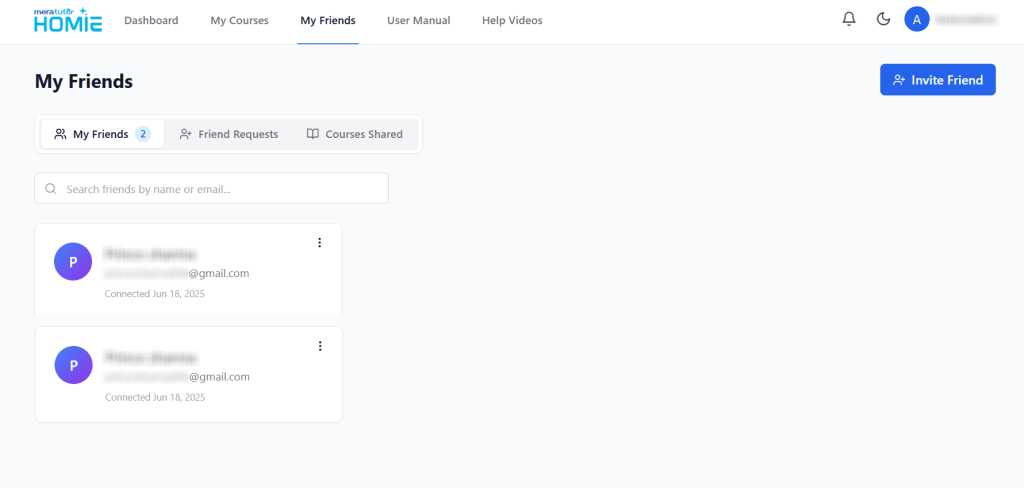
These features are accessible by visiting the “My Friends” section, which is right next to the “My Courses” section on the menu bar in the Dashboard. There are 3 tabs here:
- My Friends – Lists all the friends you currently have on the platform.
- Friend Requests – Displays the list of friend requests sent and received.
- Courses Shared – Lists all the courses that have been shared by and with you.
Sign up on MeraTutor for free to get started today!
3. Improved Basic Mode with a New GenAI Model
The Basic Mode has been powered up with a more refined GenAI model, delivering more accurate, context-aware responses that feel smarter and more intuitive.
4. Detailed AI Credit Usage
Transparency takes center stage with a revamped AI credits view that now shows a breakdown of your AI credit consumption. This helps users better understand and manage their platform usage.
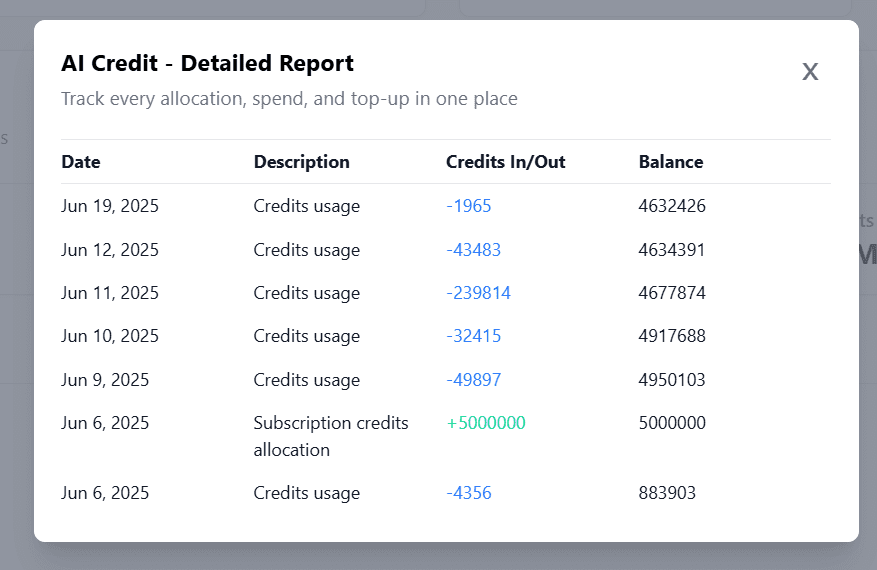
To get a detailed view of the AI credits usage, simply go to the Dashboard and scroll down to the “Credit Usage Statistics” card. On the right side, you will see a clipboard icon. Click on it to open the “AI Credit – Detailed Report” screen, where you get a detailed view of your AI credits utilisation.
5. Safe Chat Alerts for Off-Topic Queries
Starting from MeraTutor.ai 1.9, all off-topic queries are flagged and visible in the “Review Chat” option in the “Safe Chat Alerts” card, ensuring no interaction goes unnoticed.
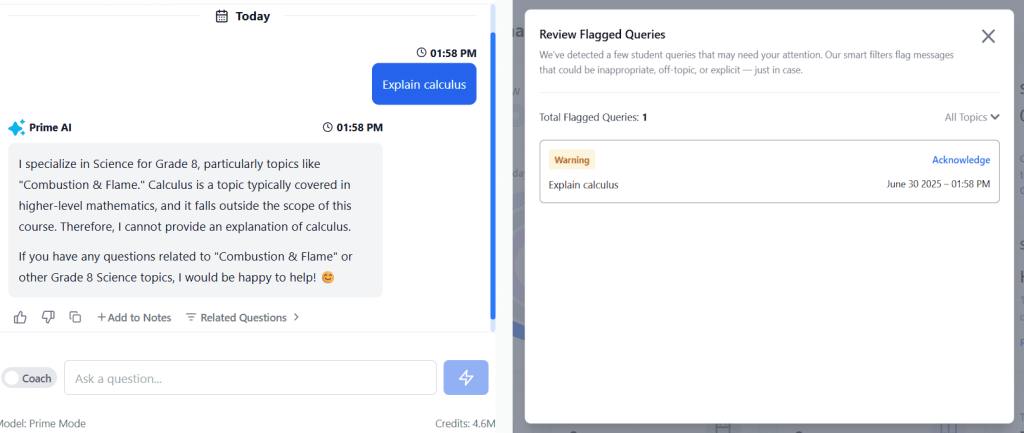
The left half of the image shows an off-topic query – asking about calculus in a course on science. The right half of the image shows the query being captured and available for acknowledgment in the “Safe Chat Alerts” section.
6. Set Your Own Learning Goals
Users now have the flexibility to adjust their learning journey from the very start or midway. The platform allows editing of Learning Duration, Learning Curiosity, Learning Milestones, and Weekly Goals – making it easier to realign goals with changing needs.

The settings are available on the Dashboard itself. Click on the “Edit Learning Goals” button on the lower left corner of the “Learning Goals” card to access it.
7. Manage Allocated Storage
A new “Manage Storage” button on the dashboard directs users to their PDF library, where they can easily delete files to free up space – ensuring smooth performance without clutter.
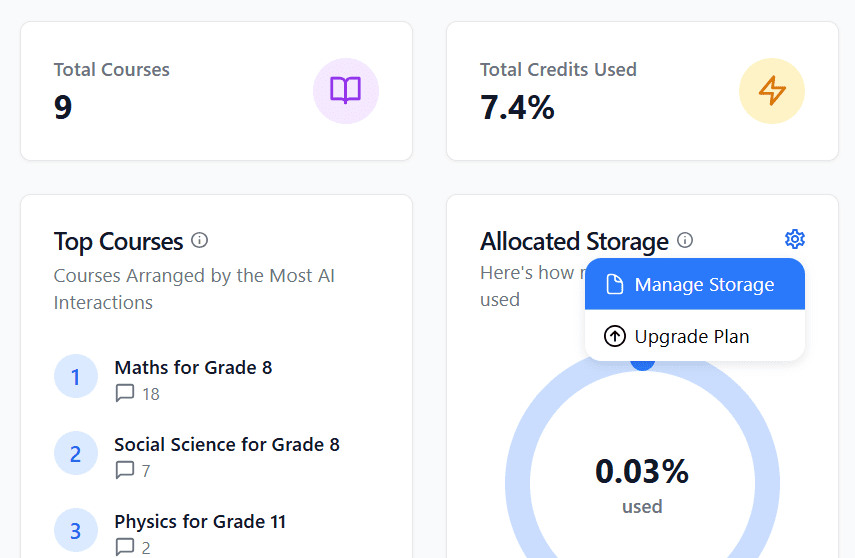
You can find the option by going to the “Allocated Storage” card on the Dashboard. Click the gear icon on the top right corner of the card to see the “Manage Storage” option.
8. New “Explore” Tab for Capturing All Related Questions
The newly introduced “Explore” tab is designed to enrich the learning experience by surfacing all related questions connected to the user’s queries. Instead of stopping at a single answer, learners can now view a broader context, discovering associated topics and follow-up questions that help deepen understanding.
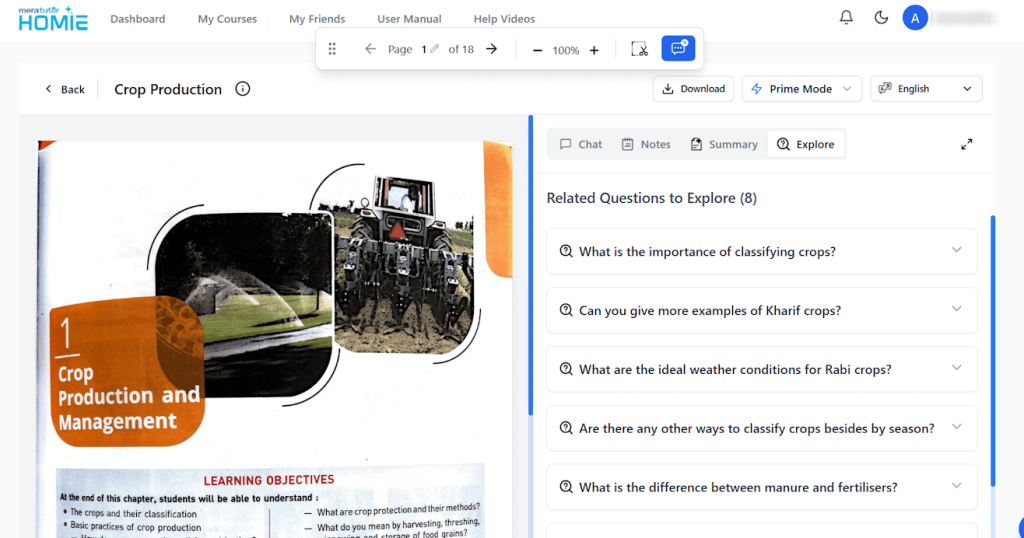
The new tab sits right next to the “Summary” tab. It’s a valuable feature for learners who want to dig deeper into topics and uncover contextual knowledge.
9. Enhanced Safe Chat Alerts View
Safety and monitoring have been upgraded. The “Safe Chat Alerts” card now includes more details to help users, parents, and educators maintain a secure learning environment.
10. New “Help Videos” Section

A new “Help Videos” section – located next to the “User Manual” section – provides quick visual guidance on making the most of Meratutor’s features – perfect for new users and seasoned learners alike.
11. Calendar Starts on Monday
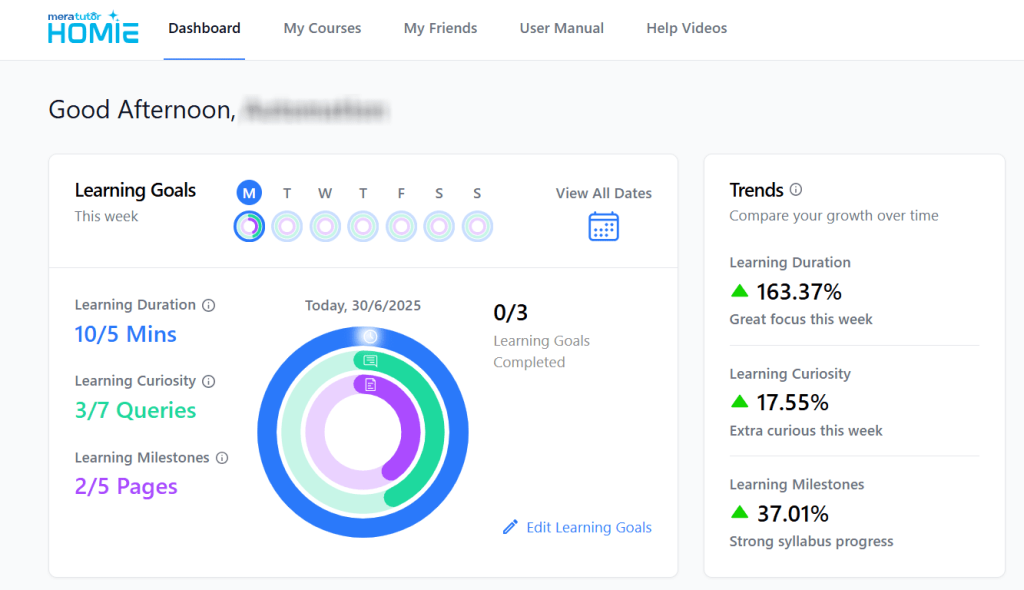
A small but impactful tweak: weekly calendars now start on Monday instead of Sunday, better aligning with academic and professional schedules.
What is MeraTutor.ai?
Meratutor is an AI-powered personal learning assistant that blends smart tutoring with personalized goal setting and resource management. It acts as a companion for students, educators, and independent learners by offering features like AI chatbot, learning goals, AI snipping, and detailed learning analytics. Designed to support both individual study, MeraTutor.AI adapts to each user’s style, helping them build knowledge more effectively and with greater confidence.
Its versatility lies in its ability to cater to diverse learning needs – whether you’re preparing for an exam, exploring a new subject, or guiding someone through a course. With intuitive features like Coach Mode, course sharing, and dynamic dashboards, MeraTutor.ai transforms passive studying into an engaging, self-directed experience. It’s not just delivering answers; it’s about cultivating deeper understanding and long-term academic growth.
Conclusion
The release of Meratutor 1.9 is more than just an update – it’s a leap forward in how learners engage with AI-powered education. With features that promote critical thinking, foster collaboration, and provide greater customization, MeraTutor.AI continues to evolve into a truly intelligent learning companion. Whether you’re setting new goals, exploring fresh content, or studying with friends, these enhancements ensure your learning experience remains seamless, empowering, and future-ready.
Ready to Experience the More Refined MeraTutor.ai 1.9?
If you haven’t explored the latest features yet, now’s the perfect time to dive in. From Coach Mode’s guided learning approach to the ease of sharing courses with friends, MeraTutor.ai 1.9 is built to make your learning smarter and more interactive than ever.

Log in to your dashboard today and try out the new tools designed to support your goals. Whether you’re refining your study plan or collaborating on a course, Meratutor is here to elevate every step of your learning journey.
Sign Up Now
FAQs
1. What is Coach Mode in MeraTutor.ai?
Coach Mode uses the Socratic questioning technique to guide learners through critical thinking instead of providing direct answers. This helps users build deeper understanding and problem-solving skills.
2. Can I share my courses with friends on Meratutor?
Yes! The new update allows you to add friends and share courses, making collaborative learning easy and engaging.
3. How do I edit my learning goals on the platform?
Users can now adjust their learning duration, curiosity levels, milestones, and weekly goals directly from their dashboard, making goal-setting more flexible and personalized.
4. Where can I find the new “Explore” tab?
The “Explore” tab is located next to the “Summary” tab. It displays related questions to the ones you’ve asked, helping you broaden your understanding of any topic.
5. How do I manage my storage on MeraTutor.ai?
You can click the “Manage Storage” button on the “Allocated Storage” card on the Dashboard to access your PDF library and delete files, freeing up space for new materials.
